- sql server错误21776:[SQL-DMO]名称"dbo"在Users集合中
- StringBuilder在.Net中的用法说明
- 微信小程序里的模块代码到底用import导入还是require导入
- C#中String.Format 几点使用
- C#代码与javaScript函数的相互调用
- DataView与DataRowView的用法
- css中设置文字不换行,超过的部分用“...”代替
- ASP.NET中Request.InputStream使用
- thinkphp中普通方法与静态方法调用区别
- SEO项目的操作流程及中小网站优化技巧(2)
邮箱:
手机:15383239821
小程序的TLS版本必须大于等于1.2的问题的解决方法
在解决这个问题之前,我们需要了解一下,当前的系统环境是否支持TLS1.2以上,可以参考一下表格:
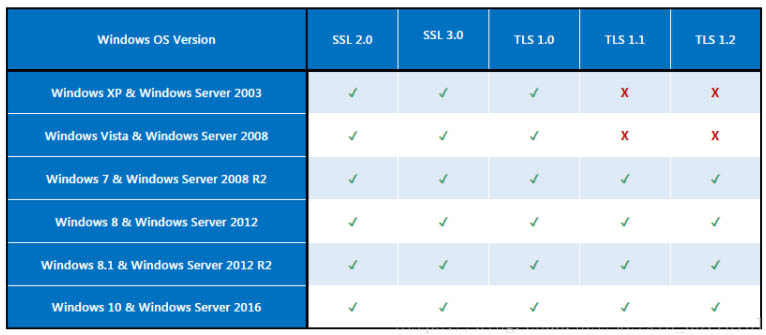
做小程序开发时候,可能会遇到的一个常见问题:对应的服务器 tls 为 tls 1.0,小程序要求的TLS版本必须大于等于1.2。
解决思路是修改注册表以支持TSL1.2版本。
方法是:复制以下代码保存到txt文件,并重命名为reg后缀文件。上传到服务器中,点击执行,然后重启服务器即可。
你也可直接下载该资源文件,上传到服务器中执行即可。
Windows Registry Editor Version 5.00
[HKEY_LOCAL_MACHINE\SYSTEM\CurrentControlSet\Control\SecurityProviders\SCHANNEL\Protocols]
[HKEY_LOCAL_MACHINE\SYSTEM\CurrentControlSet\Control\SecurityProviders\SCHANNEL\Protocols\Multi-Protocol Unified Hello]
[HKEY_LOCAL_MACHINE\SYSTEM\CurrentControlSet\Control\SecurityProviders\SCHANNEL\Protocols\Multi-Protocol Unified Hello\Client]
"Enabled"=dword:00000000
"DisabledByDefault"=dword:00000001
[HKEY_LOCAL_MACHINE\SYSTEM\CurrentControlSet\Control\SecurityProviders\SCHANNEL\Protocols\Multi-Protocol Unified Hello\Server]
"Enabled"=dword:00000000
"DisabledByDefault"=dword:00000001
[HKEY_LOCAL_MACHINE\SYSTEM\CurrentControlSet\Control\SecurityProviders\SCHANNEL\Protocols\PCT 1.0]
[HKEY_LOCAL_MACHINE\SYSTEM\CurrentControlSet\Control\SecurityProviders\SCHANNEL\Protocols\PCT 1.0\Client]
"Enabled"=dword:00000000
"DisabledByDefault"=dword:00000001
[HKEY_LOCAL_MACHINE\SYSTEM\CurrentControlSet\Control\SecurityProviders\SCHANNEL\Protocols\PCT 1.0\Server]
"Enabled"=dword:00000000
"DisabledByDefault"=dword:00000001
[HKEY_LOCAL_MACHINE\SYSTEM\CurrentControlSet\Control\SecurityProviders\SCHANNEL\Protocols\SSL 2.0]
[HKEY_LOCAL_MACHINE\SYSTEM\CurrentControlSet\Control\SecurityProviders\SCHANNEL\Protocols\SSL 2.0\Client]
"DisabledByDefault"=dword:00000001
"Enabled"=dword:00000000
[HKEY_LOCAL_MACHINE\SYSTEM\CurrentControlSet\Control\SecurityProviders\SCHANNEL\Protocols\SSL 2.0\Server]
"Enabled"=dword:00000000
"DisabledByDefault"=dword:00000001
[HKEY_LOCAL_MACHINE\SYSTEM\CurrentControlSet\Control\SecurityProviders\SCHANNEL\Protocols\SSL 3.0]
[HKEY_LOCAL_MACHINE\SYSTEM\CurrentControlSet\Control\SecurityProviders\SCHANNEL\Protocols\SSL 3.0\Client]
"Enabled"=dword:00000000
"DisabledByDefault"=dword:00000001
[HKEY_LOCAL_MACHINE\SYSTEM\CurrentControlSet\Control\SecurityProviders\SCHANNEL\Protocols\SSL 3.0\Server]
"Enabled"=dword:00000000
"DisabledByDefault"=dword:00000001
[HKEY_LOCAL_MACHINE\SYSTEM\CurrentControlSet\Control\SecurityProviders\SCHANNEL\Protocols\TLS 1.0]
[HKEY_LOCAL_MACHINE\SYSTEM\CurrentControlSet\Control\SecurityProviders\SCHANNEL\Protocols\TLS 1.0\Client]
"Enabled"=dword:00000001
"DisabledByDefault"=dword:00000000
[HKEY_LOCAL_MACHINE\SYSTEM\CurrentControlSet\Control\SecurityProviders\SCHANNEL\Protocols\TLS 1.0\Server]
"Enabled"=dword:00000001
"DisabledByDefault"=dword:00000000
[HKEY_LOCAL_MACHINE\SYSTEM\CurrentControlSet\Control\SecurityProviders\SCHANNEL\Protocols\TLS 1.1]
[HKEY_LOCAL_MACHINE\SYSTEM\CurrentControlSet\Control\SecurityProviders\SCHANNEL\Protocols\TLS 1.1\Client]
"DisabledByDefault"=dword:00000000
"Enabled"=dword:00000001
[HKEY_LOCAL_MACHINE\SYSTEM\CurrentControlSet\Control\SecurityProviders\SCHANNEL\Protocols\TLS 1.1\Server]
"DisabledByDefault"=dword:00000000
"Enabled"=dword:00000001
[HKEY_LOCAL_MACHINE\SYSTEM\CurrentControlSet\Control\SecurityProviders\SCHANNEL\Protocols\TLS 1.2]
[HKEY_LOCAL_MACHINE\SYSTEM\CurrentControlSet\Control\SecurityProviders\SCHANNEL\Protocols\TLS 1.2\Client]
"DisabledByDefault"=dword:00000000
"Enabled"=dword:00000001
[HKEY_LOCAL_MACHINE\SYSTEM\CurrentControlSet\Control\SecurityProviders\SCHANNEL\Protocols\TLS 1.2\Server]
"Enabled"=dword:00000001
"DisabledByDefault"=dword:00000000
注意:为保险起见,执行前,先到注册表HKEY_LOCAL_MACHINE\SYSTEM\CurrentControlSet\Control\SecurityProviders\SCHANNEL\Protocols,右键导出,作一个备份。如有异常,可还原。
- 上一篇:小程序隐私指引完整填写范本
- 下一篇:开发个人小程序注意的事项
-
2010-10-02C#本质;方法和参数
-
2012-06-30关键词的选择
-
2013-06-23char、varchar、text和nchar、nvarchar、ntext的区别
-
2025-08-22Entity Framework 数据生成选项DatabaseGenerated
-
2014-02-24HTML 事件属性
-
2020-07-28SEO优化-网站优化-怎样做好网站自然排名