- SQL Group by 用法
- 匹配数字和字母密码的正则表达式
- 淘宝里面说的种草拔草是指的什么
- composer创建tp项目,提示You can also run `php --ini`解决方法
- VSCode环境自定义配色方案
- .net中request同request.form的比较
- 什么是商户API证书?如何获取商户API证书?
- base.OnModelCreating
- 什么是H1标签,网站优化时怎么使用H1标签?
- php如何是用define让他起到全局的常量的作用
邮箱:
手机:15383239821
String.formatO的详细用法
问题
在开发中一段字符串的中间某一部分需要可变的。如:文本要展示“张三用户来自深圳,年龄18,性别男..."
其中的张三是用户名,每个用户都是不一样的;
地区深圳为可变的String数据;
年龄18为可变的int数据;
性别男为可变的String数据。
解决方式
使用 String.format 方法来解决。
public static void main(String[]args){
String name = "张三";
String city ="深圳";
int age = 18;
String sex = "男":
String format = String.format("%s用户来自%s,年龄%d,性
别%s..,name, city,age,sex):
System.out.printIn(format);
}
String.format()说明
1. String.format() 字符串两个重载方法
format(Stringformat,Object..args):新字符串使用本地语言环境,制定字符串格式和参数生成格式化的新字符串。
format(Locale locale, String format,Object. args):使用指定的语言环境,制定字符串格式和参数生成格式化的字符串。
2.占位符类型
转换符详细说明 示例
%s 字符串类型 “值得点赞”
%c 字符类型 'h'
%b 布尔类型 true
%d 整数类型(十进制) 88
%x 整数类型(十六进制) FF
%0 整数类型(八进制) 77
%f 浮点类型 7.777
%a 十六进制浮点类型 FF.35AE
%e 指数类型 9.38e+5
%g 通用浮点类型(f和e类型中较短的)
%h 散列码
%d% 百分比类型
%n 换行符
%tx 日期与时间类型
示例说明
public static void main(String[] args)
String str;
// %s
str = String.format("Hi,%s", "布鲁斯"):
System.out.printIn(str):
// %c %n
str = String.format("字母c的大写是:%c %n",'C'):
System.out.printIn(str):
1/%b
str = String.format("布尔结果是:%b",3>2):
System.out.printIn(str):
1// %d
str = String.format("100的一半是:%d",100/2):
System.out.printIn(str):
// %x
str = String.format("100的16进制数是:%x",100):
System.out.printIn(str):;
1// %o
str = String.format("100的8进制数是:%o",100);
System.out.printIn(str):
1/ %f
str = String.format("50元的书打8.5折扣是:%f 元",50*0.85);
System.out.printIn(str):
1// %a
str = String.format("上面价格的16进制数是:%a",50 * 0.85):
System.out.printIn(str):
//%e
str = String.format("上面价格的指数表示:%e",50*0.85);
System.out.printIn(str):
// %g
str =String.format("上面价格的指数和浮点数结果的长度较短的是:%g",50*0.85):
System.out.println(str):;
//%d%
str = String.format("上面的折扣是:%d%%",85):
System.out.printIn(str):
1/%h
str = String.format("字母A的散列码是:%h",'A'):
System.out.println(str):;
输出结果是:
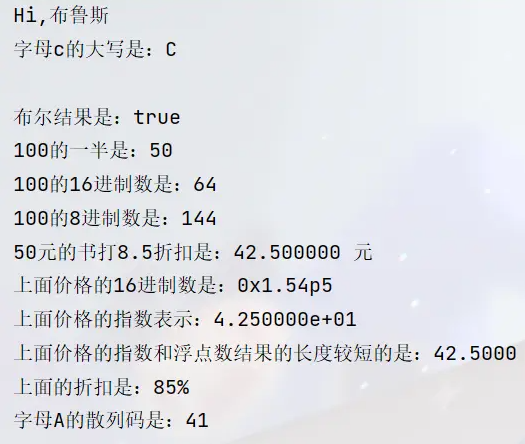
-
2010-07-20SEO项目的操作流程及中小网站优化技巧(2)
-
2010-10-31asp.net中“基类包括字段,但其类型与控件的类型
-
2010-11-11友情链接常见欺骗手段
-
2012-07-02网站标题、关键词、描述的设置及注意
-
2010-09-24JavaScript中逻辑或运算符
-
2023-04-10ThinkPHP6.0 入门3,连接配置数据、模型定义