
- SEO关键词分类及选择举例
- WAP浏览器1.0与2.0的版本区别
- 伪静态下不能使用FCKeditor的解决方案ok
- 绩效考核的原则
- javascript:void(0)
- wwww
- DTO和ViewModel的区别
- 什么是跨站脚本(CSS/XSS)?
- 学习asp.net比较完整的流程
- 关键词优化的几个步骤
邮箱:
手机:15383239821
c#是如何操作xml
大纲:
1.创建XML并实现保存
2.向XML中添加属性
3.向XML中追加内容
4.读取XML文件
5.读取带属性的XML文件,含有移除(有一句提到)
1.创建XML并实现保存
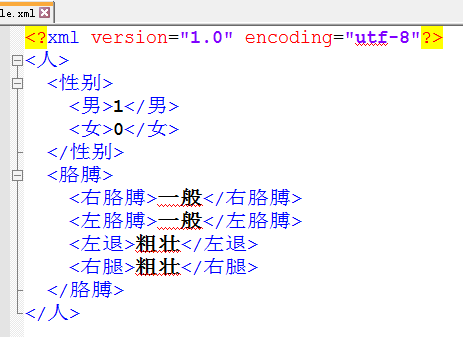
首先,我们要实现添加不含属性的xml文档。这里给出一个类,和一个调用方法以及贴出效果图(案例中我用的中文xml,希望不给你带来观看效果)
public static void CreateXML(string xmlName)
{
//通过代码创建XML文档
//1、引用命名空间 System.Xml
//2、创建一个 xml 文档
XmlDocument xml = new XmlDocument();
//3、创建一行声明信息,并添加到 xml 文档顶部
XmlDeclaration decl = xml.CreateXmlDeclaration("1.0", "utf-8", null);
xml.AppendChild(decl);
//4、创建根节点
XmlElement rootEle = xml.CreateElement("人");
xml.AppendChild(rootEle);
//5、创建子结点|属性:性别
XmlElement childEle = xml.CreateElement("性别");
rootEle.AppendChild(childEle);
XmlElement c2Ele = xml.CreateElement("男");
c2Ele.InnerText = "1";
childEle.AppendChild(c2Ele);
c2Ele = xml.CreateElement("女");
c2Ele.InnerText = "0";
childEle.AppendChild(c2Ele);
//6、创建子节点|属性:四肢
childEle = xml.CreateElement("胳膊");
rootEle.AppendChild(childEle);
c2Ele = xml.CreateElement("右胳膊");
c2Ele.InnerText = "一般";
childEle.AppendChild(c2Ele);
c2Ele = xml.CreateElement("左胳膊");
c2Ele.InnerText = "一般";
childEle.AppendChild(c2Ele);
c2Ele = xml.CreateElement("左退");
c2Ele.InnerText = "粗壮";
childEle.AppendChild(c2Ele);
c2Ele = xml.CreateElement("右腿");
c2Ele.InnerText = "粗壮";
childEle.AppendChild(c2Ele);
xml.Save(xmlName);
}
调用方法:CreateXML("People.xml");
运行效果如下:
2.向XML中添加属性
在上面的类中, 最后的xml.Save(xmlName);前添加下面的代码
//添加带有属性的节点
childEle = xml.CreateElement("hair");
childEle.SetAttribute("Color", "black");
childEle.InnerText = "头发";
rootEle.AppendChild(childEle);
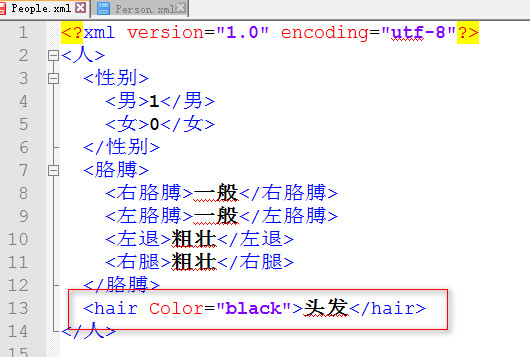
运行,查看你的xml文档,就会多出来一行:
<hair Color="black" />
效果如图:
3.向XML中追加内容
创建一个控制台程序:
Main函数如下
static void Main(string[] args)
{
//创XML建对象
XmlDocument doc = new XmlDocument();
//声明根节点
XmlElement books;
//判断文件是否存在
if (File.Exists("Books.xml"))
{
//该文件存在
//加载文件
doc.Load("Books.xml");
//获得根节点
books = doc.DocumentElement;
}
else//该文件不存在
{
//创建声明
XmlDeclaration dec = doc.CreateXmlDeclaration("1.0", "utf-8", );
doc.AppendChild(dec);
//创建根节点
books = doc.CreateElement("Books");
doc.AppendChild(books);
}
//开始正常写入信息就可以了
XmlElement book1 = doc.CreateElement("Book");
books.AppendChild(book1);
XmlElement name = doc.CreateElement("Name");
name.InnerText = "大话西游"+(new Random()).Next(0,1000);
book1.AppendChild(name);
doc.Save("Books.xml");
Console.WriteLine("追加完成");
Console.ReadKey();
}
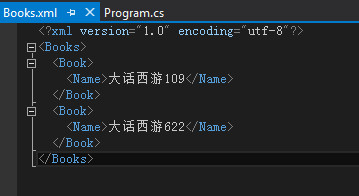
运行两次,效果图:
4.读取XML文件
这里没有详细写,重点在第5条。你可以找到答案
//获得子节点 返回数组
XmlNodeList xnl = books.ChildNodes;
foreach (XmlNode item in xnl)
{
Console.WriteLine(item.InnerXml+":"+ item.InnerText);
}
5.读取带属性的XML文件
创建一个控制台程序,你不需要关心xml的创建等等,我写好了,都在这里Program.cs代码:
using System;
using System.Collections.Generic;
using System.Linq;
using System.Text;
using System.Threading.Tasks;
using System.Xml;
namespace _027创建XML文档
{
class Program
{
static void Main(string[] args)
{
CreateXML("People.xml");
ReadXML("People.xml");
Console.WriteLine("创建成功");
Console.ReadKey();
}
public static void ReadXML(string filename)
{
//创建对象
XmlDocument xml = new XmlDocument();
//加载 xml 文件
xml.Load(filename);
//获取根节点
XmlElement rootEle = xml.DocumentElement;
//获取子节点集合
XmlNodeList xnl = xml.SelectNodes("/人/胳膊/左胳膊");
foreach (XmlNode item in xnl)
{
Console.WriteLine(item.Attributes["毛"].InnerText);// .Value);
//Console.WriteLine(item.Attributes["Hair"].Value);
}
//5、移除
//xnl.RemoveAll();
}
public static void CreateXML(string xmlName)
{
//通过代码创建XML文档
//1、引用命名空间 System.Xml
//2、创建一个 xml 文档
XmlDocument xml = new XmlDocument();
//3、创建一行声明信息,并添加到 xml 文档顶部
XmlDeclaration decl = xml.CreateXmlDeclaration("1.0", "utf-8", null);
xml.AppendChild(decl);
//4、创建根节点
XmlElement rootEle = xml.CreateElement("人");
xml.AppendChild(rootEle);
//5、创建子结点|属性:性别
XmlElement childEle = xml.CreateElement("性别");
rootEle.AppendChild(childEle);
XmlElement c2Ele = xml.CreateElement("男");
c2Ele.InnerText = "1";
childEle.AppendChild(c2Ele);
c2Ele = xml.CreateElement("女");
c2Ele.InnerText = "0";
childEle.AppendChild(c2Ele);
//6、创建子节点|属性:四肢
childEle = xml.CreateElement("胳膊");
rootEle.AppendChild(childEle);
c2Ele = xml.CreateElement("右胳膊");
c2Ele.InnerText = "一般";
childEle.AppendChild(c2Ele);
c2Ele = xml.CreateElement("左胳膊");
c2Ele.SetAttribute("毛", "真密");
c2Ele.InnerText = "一般";
childEle.AppendChild(c2Ele);
c2Ele = xml.CreateElement("左退");
c2Ele.InnerText = "粗壮";
childEle.AppendChild(c2Ele);
c2Ele = xml.CreateElement("右腿");
c2Ele.InnerText = "粗壮";
childEle.AppendChild(c2Ele);
//添加带有属性的节点
childEle = xml.CreateElement("hair");
childEle.SetAttribute("Color", "black");
childEle.InnerText = "头发";
rootEle.AppendChild(childEle);
xml.Save(xmlName);
}
}
}
运行,你会得到:“真密”
-
2019-08-16ExecuteScalar 返回值问题
-
2024-10-06什么是SVG?SVG快速入门
-
2023-03-26Navicat建数据库时字符集与排序规则说明
-
2013-04-26gbk与utf8的区别和比较
-
2023-09-20php里isset是什么意思
-
2013-06-11加密ASP网页—Script Encoder利器